

By Nikolai Kutiavin, C++ engineer writing on architecture and build systems
If you asked me today to build the same C++ application I built as a student, the result would look completely different.
Not because I know more C++ syntax.
I would still use many of the same classes, containers, algorithms, and language features. What changed much more is how I see the application itself.
As a student, I saw a C++ project mostly as a collection of files and classes. My questions were simple: Which .cpp files do I need? Where should this new class go? How do I make everything compile?
After more than ten years of professional C++ development, I start with different questions: What are the components of this application? What responsibilities belong to each of them? Which dependencies should be allowed? How can they be tested independently? And how should the build system enforce these decisions?
This difference matters because a professional application has to do much more than work once.
It has to remain understandable, testable, and changeable after months or years of development.
That change in perspective did not come from learning one particular C++ feature. It came from maintaining production code, dealing with changing requirements, fixing architectural mistakes, writing tests, working with build systems, and discovering which decisions make a codebase easier to evolve and which ones make every future change more painful.
To make this shift concrete, consider a deliberately small example: a grep-like desktop application with a Qt user interface.
I will show how I would have approached this application as a student, and how I would design the same application today.
From files to components
As a student, I rarely thought about splitting an application into components.
I usually started with whatever project structure my IDE generated. When I needed a new class, I created another .h and .cpp file in the same project directory.
Suppose I had been asked to build a grep-like application with a Qt user interface.
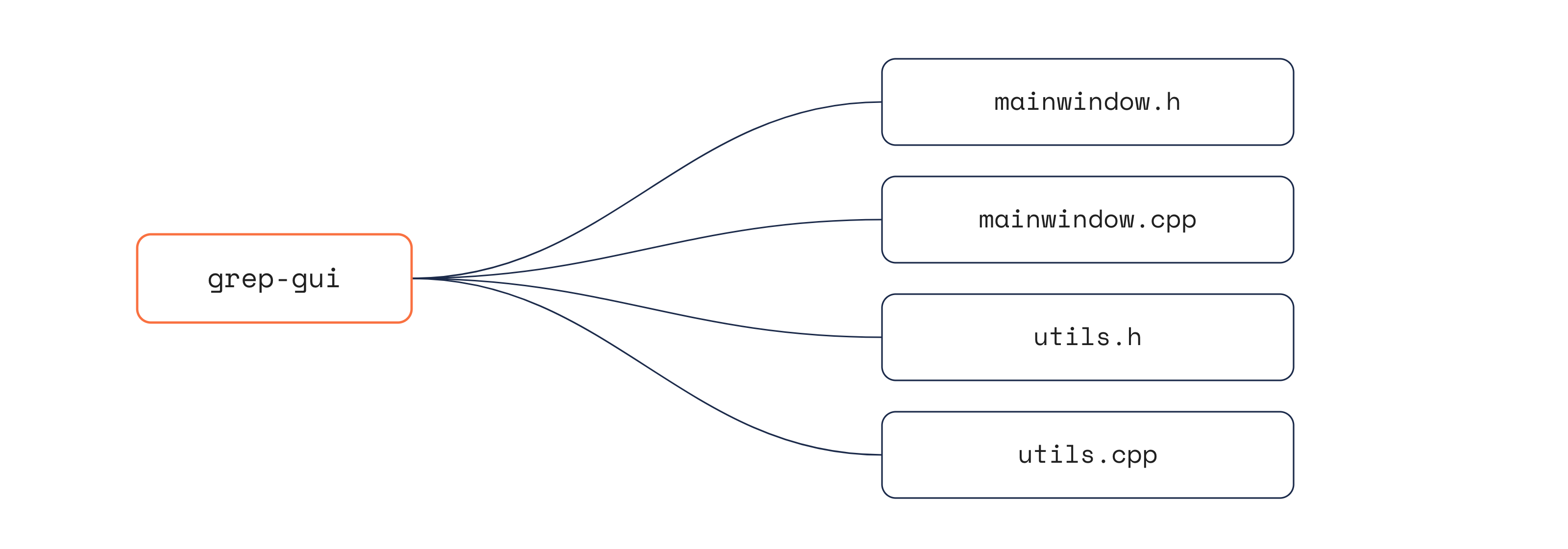
I would probably have started with the generated MainWindow class. User interaction, error handling, and search logic would gradually accumulate in mainwindow.cpp.
I probably would not have put everything into that class. Some file-related operations might have escaped into the traditional refuge of homeless functionality:
utils.h and utils.cpp.
And I would have ended up with something like this:
For a small project, this can work surprisingly well.
The problem appears when the program starts growing.
MainWindow gradually becomes responsible for more than the user interface. Dependencies become implicit. Changing one part of the program unexpectedly affects another. Testing the search logic requires dealing with GUI code.
Today, I would start from a different question:
What are the components of this application?
For this small program, I might identify three:
files-search: file operations and match lookup;
gui: user interaction and presentation;
main: application composition and startup.
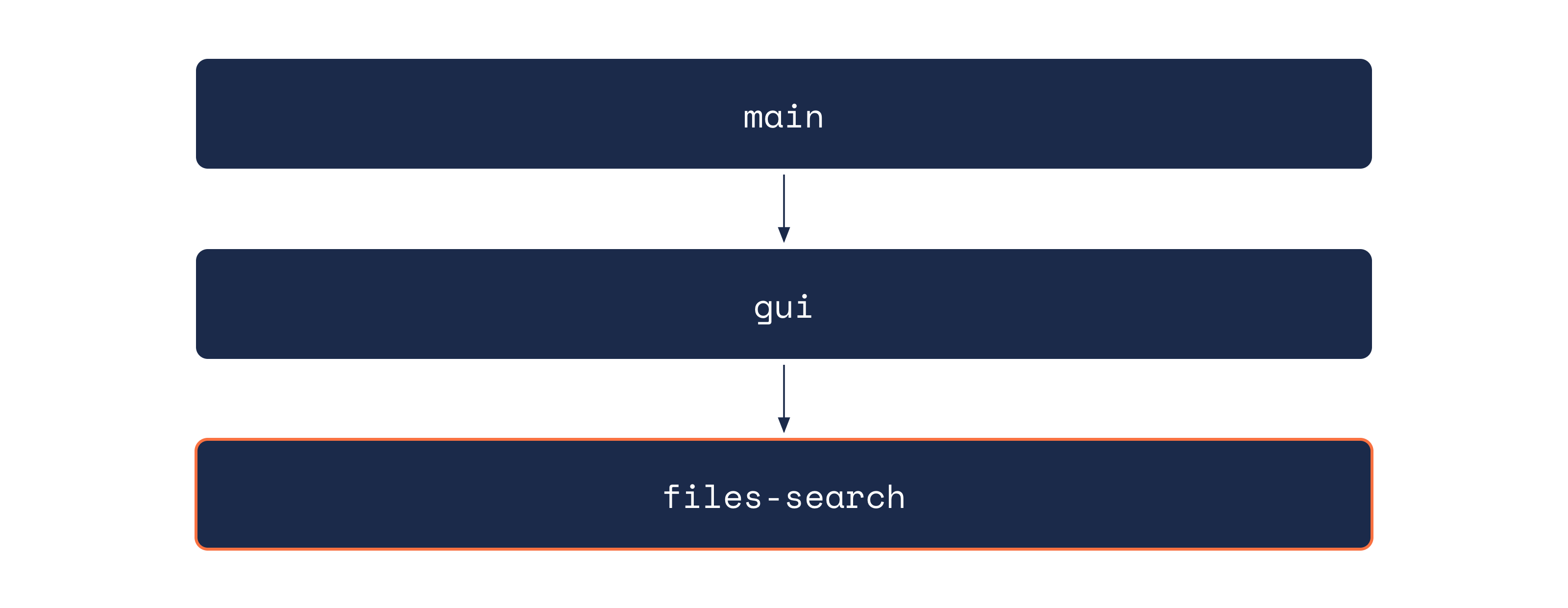
This looks like a small distinction, but it changes many later decisions.
Each component now has an explicit responsibility. Its implementation details can remain internal while only a small interface is exposed to other components.
As a result, I can change the implementation of file searching without rewriting the GUI. I can also test the search component without starting a Qt application.
The important shift is this:
I no longer see the application primarily as a collection of source files. I see it as a collection of cooperating components.
Files are merely the physical representation of that architecture.
If you recognize your own projects in the “student” version above, this is exactly the transition I explore in my book, No More Helloworlds: Build a Real C++ App.
The book builds a complete C++ application step by step and shows how project structure, architecture, CMake, testing, and development practices fit together in a real project.
From “it compiles” to build architecture
As a student, I considered CMake mainly as a way to tell the build system which .cpp files to compile. For the grep-like application, I would have created a single CMakeLists.txt in the root of the project defining one executable.
Today, I see the build system as another tool for expressing architecture.
I physically separate components and place them into dedicated subdirectories in the project tree. Each component contains its own CMakeLists.txt, which defines:
the source files that belong to the component,
properties that are implementation details,
properties exposed as part of its public API.
The root directory then contains a CMakeLists.txt that sets up the project-wide build configuration and includes the component-specific subdirectories:
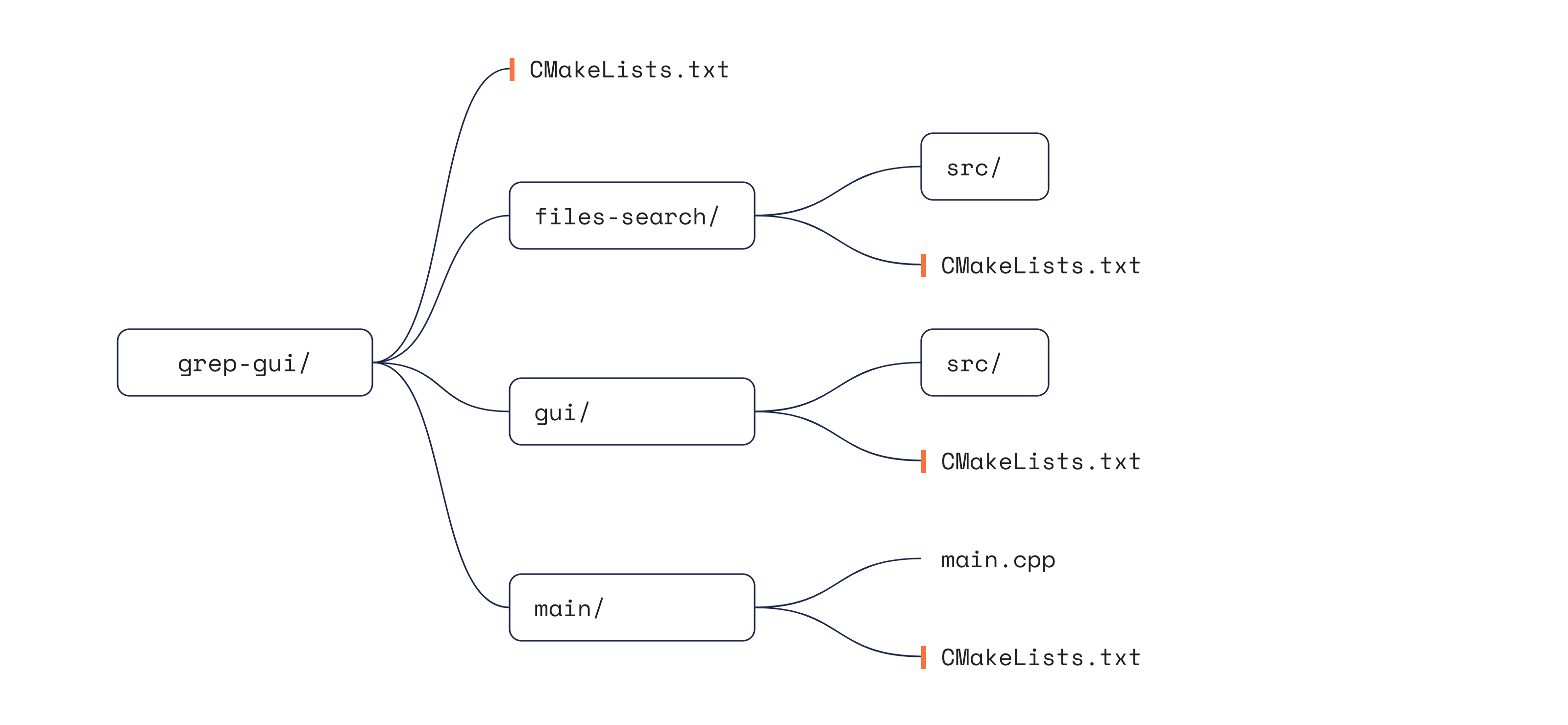
For example, a component-specific CMakeLists.txt may define:
include directories containing publicly available headers,
include directories containing implementation-only headers,
libraries used only by the implementation.
These relationships are expressed using the PUBLIC and PRIVATE keywords in the corresponding CMake commands.
If files-search uses Boost.Filesystem only as an implementation detail and keeps its public headers in the include directory, its CMakeLists.txt might look like this:
add_library(files-search ...)

target_include_directories(files-search PRIVATE src)
target_include_directories(files-search PUBLIC include)
target_link_libraries(files-search PRIVATE Boost::filesystem)
Any property marked as PUBLIC is propagated to targets that link against files-search.
This gives gui access to the headers in files-search/include while keeping the headers from files-search/src private.
So, my takeaway is:
A target-centric approach makes it easier to configure individual components and enforce architectural boundaries by exposing only their public APIs.
From “the code works” to testability
As a student, the most important thing for me was simply to compile and run the application.
If a user did something unexpected or a system failure occurred, well, that was the user’s problem.
Today, I have a clear understanding that automated tests are an essential part of the development cycle. They help ensure that each new change does not break existing behavior.
When I design a class or function, I always keep testability in mind.
For example, suppose a function in files-search needs to search a file for matches against a regular expression. Instead of accepting a concrete std::ifstream or a file path, I would make it work with the more general std::istream interface:
auto findMatches(std::istream& is, std::regex reg) {
  // ...
}
This makes testing much simpler. A test can construct an std::istringstream with predefined content and pass it directly to the function.
In production, the same function can receive an already opened file through an std::ifstream:
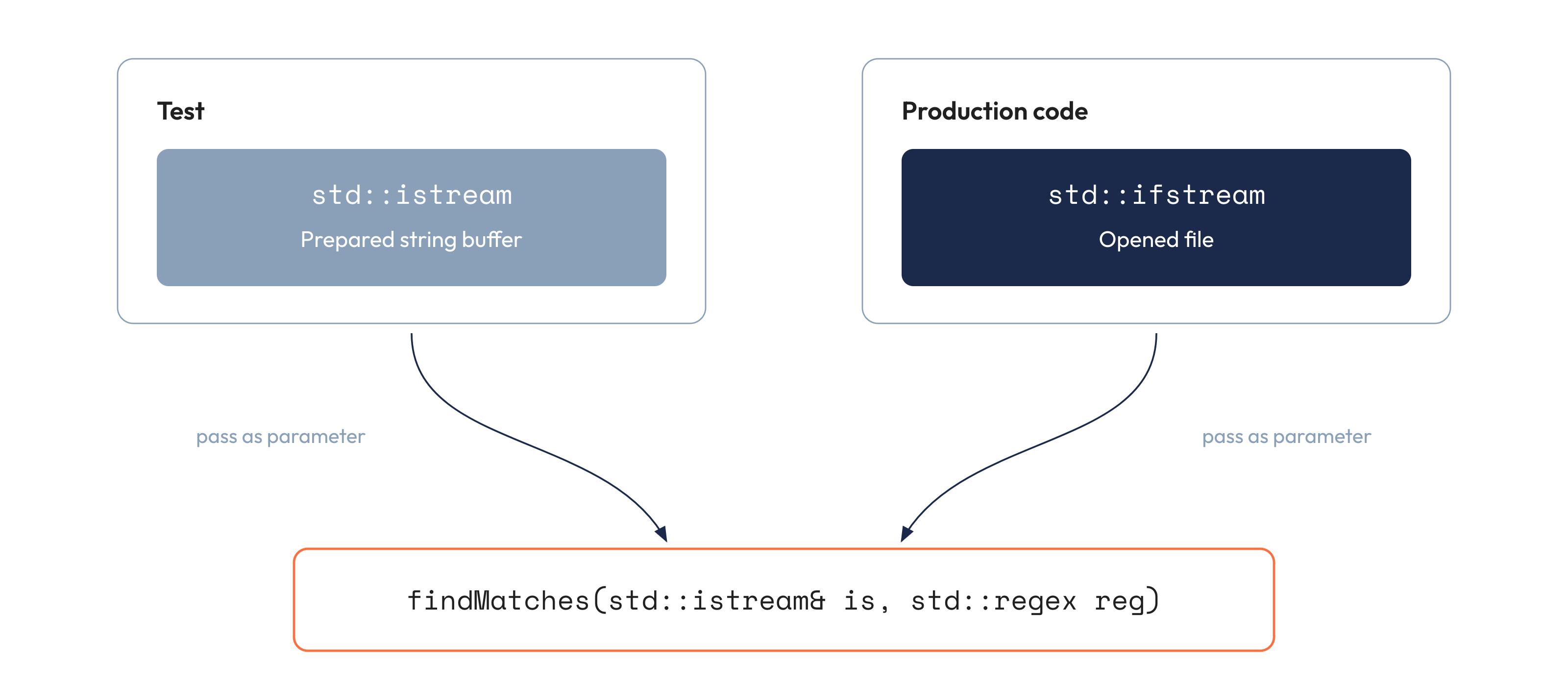
This means that changes to the matching logic can be validated against predefined input during automated tests. If a new change causes an existing test to fail, it is a strong indication that either the change introduced a bug or the expected behavior has changed.
So, my takeaway is:
Automated tests help catch bugs and regressions, but functions and types also need to be designed with testability in mind.
From classes to boundaries
As a student, I mostly thought about design in terms of classes.
When a new piece of functionality appeared, my first question was usually which class should implement it.
This often led to classes knowing too much about each other. For example, the GUI could directly use types from the internal implementation of files-search, access its data structures, or depend on details of how files were opened and processed.
The application might still be split into multiple classes, but those classes would remain tightly coupled.
Today, I pay much more attention to the boundaries between components.
For example, the gui component does not need to know how files-search traverses directories, reads files, or represents matches internally. It only needs a small contract for starting a search and receiving the result.
Instead of exposing implementation-specific types, I might define a small public API:
struct SearchRequest {
    std::filesystem::path directory;
    std::string pattern;
};

struct SearchMatch {
    std::filesystem::path file;
    std::size_t line;
    std::string text;
};

std::vector<SearchMatch> search(const SearchRequest& request);
The GUI now depends only on SearchRequest, SearchMatch, and the search() function.
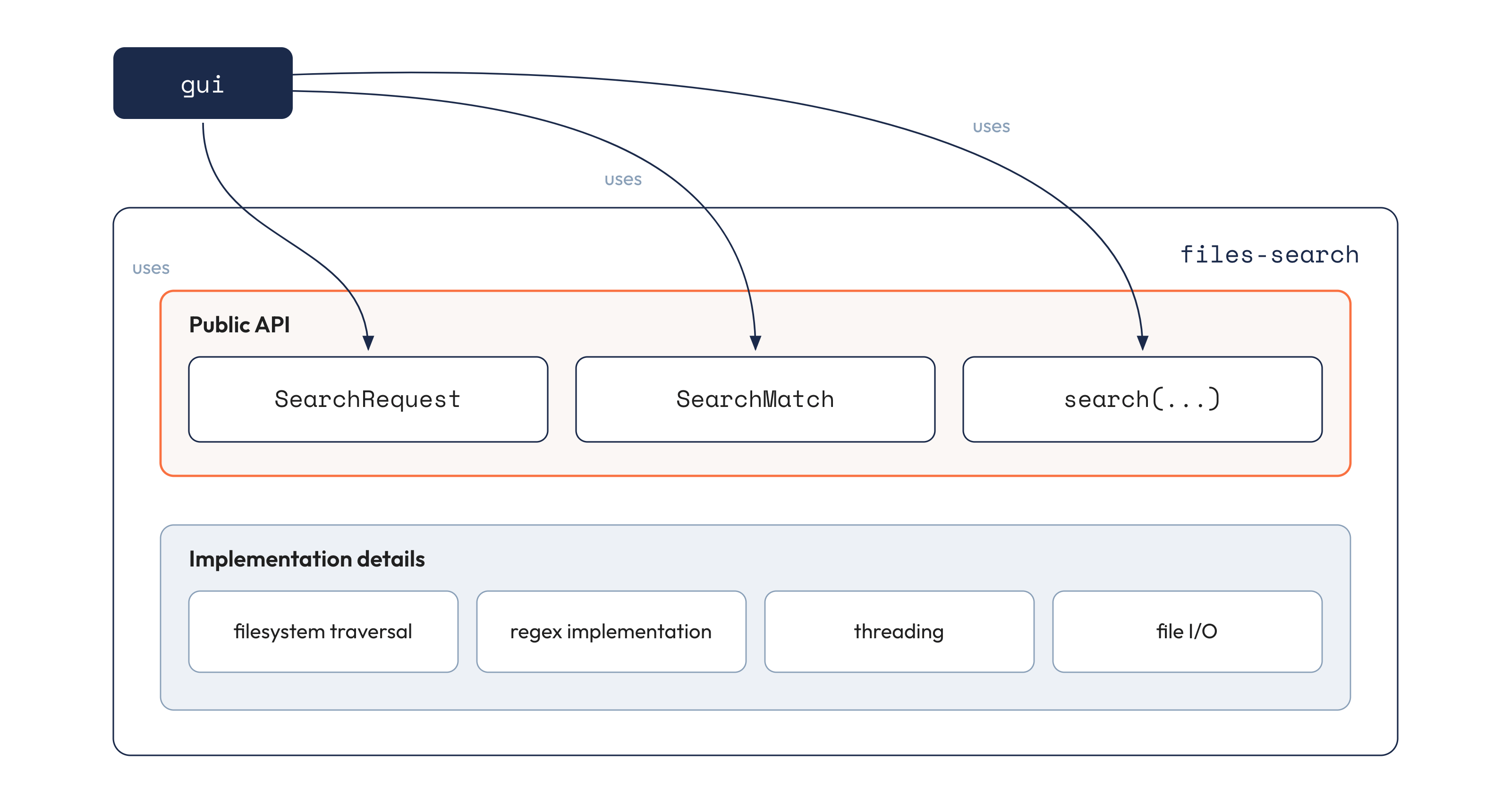
Everything else can remain an implementation detail of files-search.
This becomes especially important when the implementation changes. The component may switch to another regular-expression library, process files concurrently, or use a different strategy for directory traversal. As long as its public contract remains unchanged, the GUI does not need to know about those changes.
The same applies to errors. Instead of leaking implementation-specific exceptions across the component boundary, I can decide explicitly which failures are part of the public API and how the caller should handle them.
So, my takeaway is:
Good architecture is not just about splitting code into classes and components. It is also about minimizing what crosses the boundaries between them.
From isolated lessons to a complete project
The ideas above are not separate tricks.
Project structure affects build configuration. Build configuration reflects architectural boundaries. Architecture influences testability. And all of these decisions become part of the development workflow.
This is probably the biggest change in how I think about C++ after more than ten years of professional development: I no longer see these topics as independent skills.
They are parts of the same engineering process.
Submitted by Nikolai Kutiavin. Edited by Saqib Jan.
By Nikolai Kutiavin, software engineer with more than ten years of experience in C++, and previously an automotive software engineer at BMW. He writes about C++, CMake, architecture, and testing at sqglobe.com and in his newsletter From Complexity to Essence in C++. He is the author of No More Helloworlds: Build a Real C++ App, which develops a complete C++ application step by step and shows how CMake, testing, architecture, Git, and CI fit together in practice.